Artwork Guidance
Sending Us Your Logo? Here’s How to Get the Best Results
A simple guide to artwork file formats — and why they matter for your order.
When you place an order with us that requires a logo, one of the first things we’ll ask for is your logo or artwork. If you’ve ever heard, “We need it in another format,” don’t worry, it’s a question we’re asked all the time.
This guide will walk you through the two main types of image file, explain why the format matters, and show you how to make the process as smooth (and cost-effective) as possible.
Vector Graphics
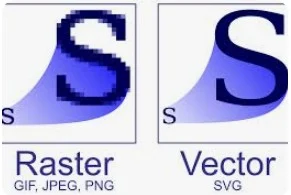
Vector files are made up of points, lines, and curves rather than individual pixels. This means they can be scaled to any size, from a business card to large advertising boards without losing a shred of quality. This means greater accuracy and faster turnaround.
Our preferred format: EPS
Our top choice is an EPS (Encapsulated PostScript) file. EPS files carry accurate colour information within the file itself, which helps us match your brand colours precisely. If you can also supply any specific colour references such as Pantones, that’s even better.
Other vector formats we can work with
- Adobe Illustrator (.ai) — The industry standard for logo design. If your designer created your logo, there’s a good chance they have an .ai file.
- PDF — PDFs can contain vector data, especially if they were exported from a design application. High-quality PDFs are often a great alternative to EPS.
- SVG — A web-friendly vector format that’s becoming increasingly common. If it’s all you have, send it over — we may be able to work with it.
Bitmap Images — When It’s All You’ve Got
A bitmap image is made up of a grid of tiny coloured squares called pixels. Think of the photos on your phone or images you save from the web — those are bitmaps. Common formats include JPEG, PNG, BMP, and TIFF.
The key limitation of bitmaps is that they have a fixed resolution. If you try to enlarge a small bitmap, the image becomes blurry or “pixelated” – you start to see the individual squares. This is why a logo that looks sharp on your website might look rough when blown up for your signage.
If a bitmap is your only option
Don’t worry — we can still work with it. Just keep these tips in mind to help us get the best result:
- Send the largest version you have – The closer the file is to the actual size you need, the better the output will be.
- Avoid files pulled from websites – Web images are usually compressed and low-resolution (72 dpi). Look for the original file from your designer or marketing materials instead.
- PNG or TIFF are preferable to JPEG if available, as they retain more detail.
- Check your brand guidelines – Many companies have a brand pack or media kit that includes high-resolution versions of their logo in multiple formats.
Quick Reference: Which File Should I Send?
| File Type | Format | Notes |
| Vector | .eps | Our preferred format — best quality, fastest production |
| Vector | .ai | Adobe Illustrator file — excellent quality |
| Vector | Often contains vector data — great alternative | |
| Vector | .svg | Web-friendly vector format — we may be able to work with it |
| Bitmap | .png / .tiff / jpeg / BMP | Send the largest file possible and avoid low-res versions |
A Handy Tip Before You Place Your Order
It’s worth checking whether more than one version of your logo exists. In many cases, the designer who originally created your logo will have produced two versions: a JPEG (or similar) for everyday use such as emails and documents, and an EPS or AI file specifically intended for print and sign production. If you’re not sure, just ask them — or ask us, and we’ll help you work it out.
If you’re unable to provide a high-quality version of your logo, we may be able to extract one from a company PDF that includes it. Simply send us the relevant document, and we’ll review it to see if it’s suitable for use
One thing to watch out for
Be aware that vector files can sometimes contain embedded bitmap images. If this is the case, resizing the file will still cause a loss of quality in the bitmap parts of the image. When in doubt, send us what you have and we’ll let you know straight away if there are any issues.